EMOM Timer Guide: How to Set Up Every Minute on the Minute Workouts
EMOM (Every Minute on the Minute) is an interval format where you start a set of reps at the top of every minute and rest for whatever time remains. Here's how it works, how to program it, and the best way to time it.
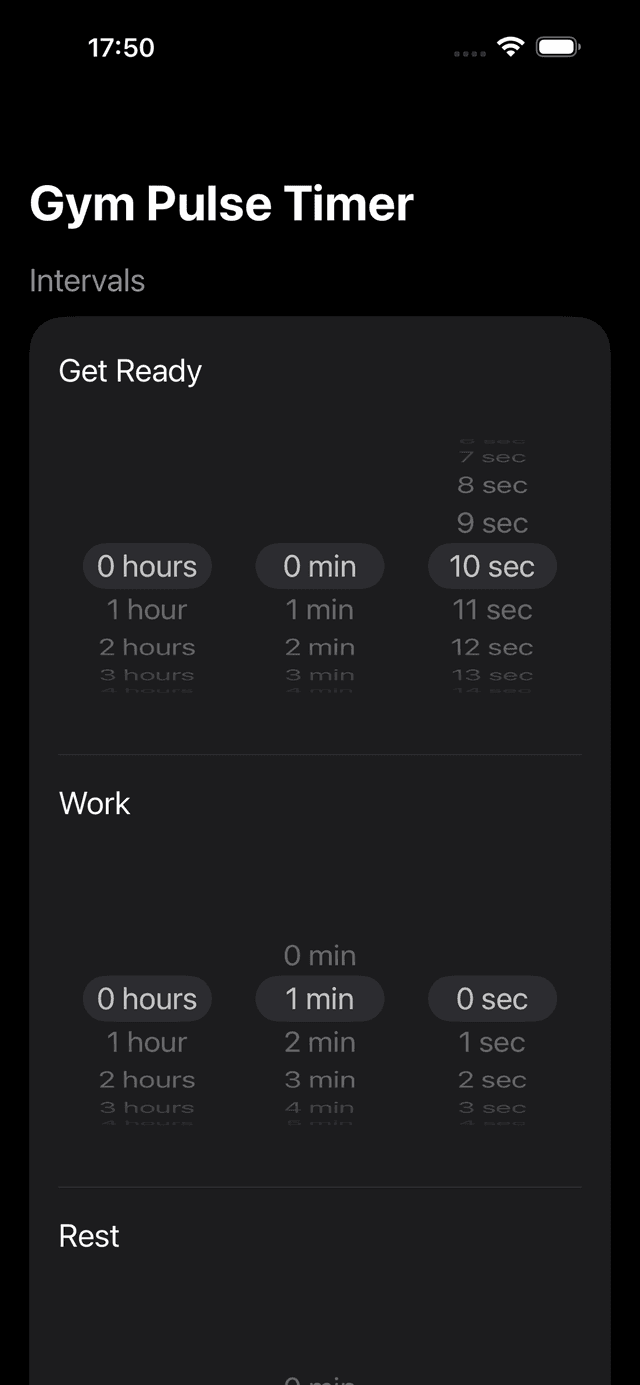
A 40-second-work / 20-second-rest EMOM preset in GymPulseTimer — the most common ladder for upper-body work.
What Is EMOM?
EMOM stands for Every Minute on the Minute. The concept is straightforward: at the start of each minute, you perform a prescribed number of reps or a specific exercise. Whatever time remains in that minute is your rest. When the next minute begins, you go again.
The format originated in CrossFit boxes in the early 2000s as a way to build work capacity and practice movement consistency under fatigue. Coaches loved it because it scaled naturally — faster athletes earned more rest, while beginners could reduce the rep count to stay within the minute.
What makes EMOM uniquely effective is the built-in accountability. Every sixty seconds, you have a new deadline. There's no drifting into longer rest periods or losing count of your sets. The clock keeps you honest, and the pacing teaches you to manage effort across an entire workout — a skill that transfers directly to competition and daily life.
EMOMs work for strength, conditioning, skill practice, and active recovery. You can run a 10-minute EMOM with heavy deadlifts or a 30-minute EMOM rotating through three bodyweight movements. The format adapts to virtually any training goal.
EMOM vs. AMRAP vs. Tabata: Which Timer Format Is Right for You?
Interval training comes in many flavors. Here's how the three most popular formats compare so you can pick the right one for your session.
| Format | Structure | Intensity | Best For |
|---|---|---|---|
| EMOM | Perform reps at the top of each minute; remaining time is rest | Moderate to high | Strength endurance, skill practice, pacing |
| AMRAP | As Many Rounds As Possible in a fixed time cap | High — self-paced | Conditioning, benchmark testing, competition |
| Tabata | 20s work / 10s rest × 8 rounds (4 minutes) | Maximum effort | VO2max improvement, fat loss, time-crunched sessions |
The key difference is pacing. Tabata demands all-out effort for every 20-second burst. AMRAP lets you choose your own pace across a longer window. EMOM sits in between — you control how fast you complete each set, but the clock resets every 60 seconds whether you're ready or not. That structured pacing is what makes EMOM ideal for building sustainable work capacity.
How to Set Up Your EMOM Timer
An EMOM round always totals 60 seconds. You split that minute into a work window and a rest window. The work portion is however long it takes to complete your reps, and the rest is whatever time remains. In a timer app, you configure this as a fixed work/rest split.
The most common EMOM timer setup is 40 seconds of work and 20 seconds of rest, giving you a generous window to finish your reps with built-in recovery. But you can adjust this to match your fitness level and goals:
| Level | Work | Rest | Rounds |
|---|---|---|---|
| Beginner | 30s | 30s | 10 |
| Intermediate | 40s | 20s | 15 |
| Advanced | 50s | 10s | 20 |
In GymPulseTimer, setting up an EMOM takes seconds. Open the app, set your work time (e.g., 40s), rest time (e.g., 20s), and number of rounds (e.g., 10–20). Save it as a custom preset called “EMOM 15” or “EMOM Strength” and start it with one tap next time.
The key is that work + rest must always equal 60 seconds. This keeps every round starting on the minute, which is the entire point of the format. If you finish your reps in 25 seconds with a 40-second work window, you get 35 seconds of rest total — the timer handles the math so you can focus on the movement.
5 EMOM Workouts for Every Fitness Level
Each workout below uses the EMOM format. Pick a work/rest split that matches your level from the table above, and aim to finish your reps with at least 10–15 seconds of rest in each round.
1. Beginner: Bodyweight EMOM
10 rounds — alternating movements each minute. No equipment needed.
- Odd minutes (1, 3, 5, 7, 9): 10 air squats
- Even minutes (2, 4, 6, 8, 10): 5 push-ups + 5 sit-ups
Timer setup: 30s work / 30s rest × 10 rounds.
2. Intermediate: Dumbbell EMOM
15 rounds — rotating through three movements every three minutes.
- Minutes 1, 4, 7, 10, 13: 10 dumbbell thrusters
- Minutes 2, 5, 8, 11, 14: 12 dumbbell rows (6 per arm)
- Minutes 3, 6, 9, 12, 15: 10 dumbbell reverse lunges
Timer setup: 40s work / 20s rest × 15 rounds.
3. Advanced: Barbell EMOM
20 rounds — heavy compound lifts with strict pacing. Use 70–80% of your 1RM.
- Minutes 1, 5, 9, 13, 17: 3 power cleans
- Minutes 2, 6, 10, 14, 18: 5 front squats
- Minutes 3, 7, 11, 15, 19: 3 push jerks
- Minutes 4, 8, 12, 16, 20: 6 deadlifts
Timer setup: 50s work / 10s rest × 20 rounds.
4. Cardio EMOM
12 rounds — heart rate stays elevated throughout. Minimal equipment.
- Minutes 1, 4, 7, 10: 15 calories on the rower (or 20 jumping jacks)
- Minutes 2, 5, 8, 11: 10 burpees
- Minutes 3, 6, 9, 12: 20 mountain climbers (10 per side)
Timer setup: 40s work / 20s rest × 12 rounds.
5. Mixed-Modal EMOM
20 rounds — combines strength, gymnastics, and conditioning. A true CrossFit-style EMOM.
- Minutes 1, 5, 9, 13, 17: 5 pull-ups
- Minutes 2, 6, 10, 14, 18: 10 kettlebell swings
- Minutes 3, 7, 11, 15, 19: 15 box jumps (20″)
- Minutes 4, 8, 12, 16, 20: 200m run (or 20 double-unders)
Timer setup: 45s work / 15s rest × 20 rounds.
Why a Dedicated Timer App Beats Watching the Clock
You could glance at a wall clock every minute, but here's why that falls apart fast: during an EMOM, you're often face-down, mid-rep, or gasping for air. Checking the clock costs you focus, form, and precious seconds of rest. A dedicated timer app solves this.
- Voice coaching — GymPulseTimer announces each new minute with an audio cue, so you know exactly when to start without looking at anything. You hear “Go” at the top of each round and a warning before your rest ends.
- Lock Screen visibility — the Live Activity puts your countdown, current round, and phase (work or rest) right on your Lock Screen and in the Dynamic Island (on iPhone). One glance tells you everything.
- Preset saving — save your favorite EMOM configurations as presets. Have a “10-min Bodyweight EMOM” and a “20-min Barbell EMOM” ready to go with one tap. No reconfiguring every session.
- Round and phase tracking — the app shows which round you're on out of your total, so you always know how far you've come and how many minutes remain.
- Consistent pacing — the timer enforces strict 60-second rounds. No accidentally taking 75 seconds because you lost track. Every minute is exactly one minute.
GymPulseTimer's custom presets map perfectly to EMOM. Set work to 40s, rest to 20s (or any combination totaling 60s), rounds to 10–20, and save it. Voice coaching announces each minute. The Live Activity shows time remaining on your Lock Screen throughout the entire workout. Because it's a free no-subscription interval timer, it's also the simplest way to run a clean EMOM without a coach standing next to you.
Start Your EMOM Timer
Create a custom EMOM preset in GymPulseTimer and start training in seconds.