Best Free Interval Timer App (2026): No-Subscription Picks for iPhone, Android & Apple Watch
Tired of paying monthly for a workout timer? Here are the best free interval timer apps for iPhone, Android, and Apple Watch with no subscription — pay once or use for free, with no recurring fees, no ads, and no account.
The best free interval timer app in 2026 is GymPulseTimer. It is free on iPhone, Android, and Apple Watch, it works offline, and the free tier covers real interval timing plus, on iPhone, Live Activities on the Lock Screen. A single $4.99 one-time Pro unlock — never a subscription — adds unlimited presets, audio cues, and voice coaching, and that pay-once model is what sets it apart from every rival on this list.
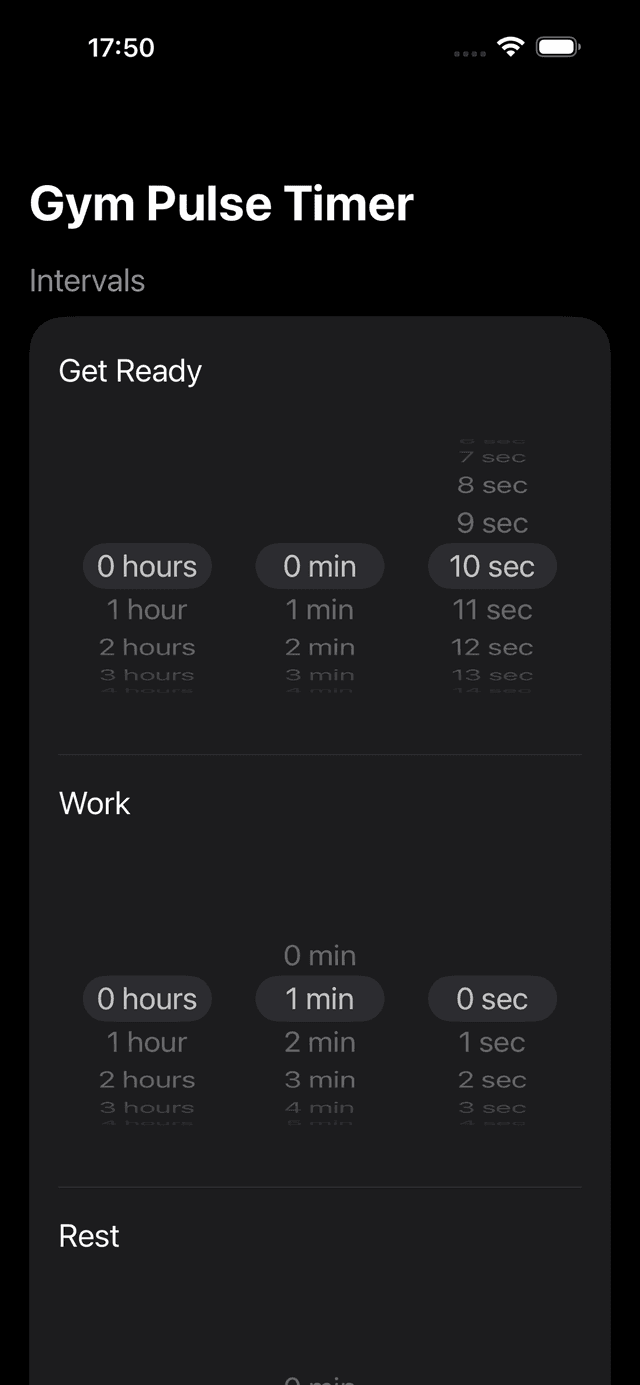
GymPulseTimer interval setup — configure once, save as a preset, $4.99 one-time Pro for the rest of the features.
Why So Many Timer Apps Moved to Subscriptions
If you've browsed the App Store for a HIIT or interval timer recently, you've probably noticed a pattern: apps that used to cost a few dollars now want $5, $8, or even $12 per month. The shift toward subscriptions has been one of the biggest trends in the App Store over the past few years, and timer apps haven't been immune.
For developers, subscriptions provide a steady revenue stream that helps fund ongoing updates and server costs. Apple also favors subscription apps in search rankings, which creates an incentive for developers to adopt the model. But for users, the math rarely works out. A simple timer app that costs $6/month adds up to $72 a year — more than many gym memberships charge for a single month.
The result is subscription fatigue. People are already paying monthly for streaming, cloud storage, fitness classes, and a dozen other services. Adding yet another subscription for something as straightforward as a countdown timer feels excessive. That's why more people are actively searching for interval timer apps with no subscription — apps you can buy once and own forever, or use completely free.
No-Subscription Interval Timers Compared (2026)
Before the deep dives, here is the no-subscription question at a glance. The table lines up GymPulseTimer against Seconds, Intervals Pro, and SmartWOD Timer on the three points that decide a pay-once timer in 2026: whether you ever pay again, whether the Apple Watch app runs independently on the wrist or merely mirrors the iPhone, and whether the timer reaches the Lock Screen and Dynamic Island.
| App | Pricing model | No subscription | Watch app runs independently | Dynamic Island | No ads / no account |
|---|---|---|---|---|---|
| GymPulseTimer | Free + $4.99 one-time Pro | Yes | Yes | Compact + expanded | No ads, no account |
| Seconds Interval Timer | Freemium + subscription | No (Pro tier recurs) | Mirrored | Compact only | Upgrade prompts |
| Intervals Pro | One-time purchase | Yes | No | No | No ads, no account |
| SmartWOD Timer | One-time purchase | Yes | Mirrored | No | No ads, no account |
Competitor entries reflect publicly observable behaviour as of 2026 and may change as those apps update. The breakdowns below explain each verdict in plain language.
What to Look for in a One-Time Purchase Timer App
Not all non-subscription timer apps are created equal. Some free apps are loaded with ads that interrupt your workout. Others lack basic features you'd expect in 2026. Here's what to prioritize when choosing a timer app without recurring fees:
- Custom intervals — you should be able to set your own work, rest, and get-ready durations rather than being locked into a handful of preset templates
- Audio and voice cues — distinct sounds or voice coaching for phase transitions so you don't have to stare at the screen mid-burpee
- Live Activities — on iPhone 14 Pro and later, your timer should appear on the Lock Screen and Dynamic Island for hands-free visibility
- Preset saving — save your favorite interval setups and launch them with a single tap instead of reconfiguring every session
- No ads — nothing kills workout momentum like a full-screen ad between rounds
- No account required — you shouldn't need to create a login or hand over personal data just to start a timer
- Clean, dark UI — large text with high contrast that's easy to read from across the gym, even in low light
5 Best Free Interval Timer Apps for iPhone (No Subscription)
We tested dozens of timer apps to find the ones that respect your wallet. Here are the five best options for iPhone users who want to avoid subscriptions.
1. GymPulseTimer — Best Overall ($4.99 One-Time)
GymPulseTimer was designed from scratch as a one-time purchase app, and it is the same app on iPhone and Android, with an Apple Watch companion. There's a free tier that covers basic interval timing, and a single $4.99 Pro upgrade that unlocks everything — forever. No monthly charges, no annual renewal, no surprise price increases.
What sets it apart is how deeply it integrates with modern iOS. Live Activities put your timer directly on the Lock Screen and Dynamic Island, so you can lock your phone, set it on a bench, and see your remaining time from meters away. The display shows your current phase (work, rest, or get ready), time left, and round count at a glance.
The preset system is flexible without being complicated. Set your work duration, rest duration, number of rounds and sets, and a get-ready countdown — then save it as a named preset. Next time, it's one tap to start. Voice coaching announces each phase transition, so you can stay focused on form instead of watching a screen.
Other details that matter: the UI is dark and high-contrast, purpose-built for gym environments. There are no ads anywhere in the app. No account or sign-up is required — you download it and start timing. And the app collects zero personal data, which is increasingly rare.
In September 2026 the Progress screen was rebuilt on both platforms (iOS 1.8.0 and Android 1.9.0). Every phone workout you finish lands there: a “This Week” card with your minutes and sessions, a plan-honored ring for how much of what you planned you completed, and a 13-week consistency heatmap in which every green cell is a day you trained. A weekly chart splits your time by workout and draws your average, and a 7-day journal keeps completion rings, an effort rating, and your notes. None of it needs an account or a connection. Pro adds 26- and 52-week views and a training-load chart.
- Live Activities on Lock Screen and Dynamic Island
- Unlimited custom presets with work, rest, rounds, and sets
- Voice coaching and audio cues for every phase
- Progress screen: This Week, plan honored, consistency heatmap, 7-day journal — all on the device
- $4.99 one-time Pro upgrade — no subscription
- No ads, no account, no data collection
- Dark, high-contrast UI designed for the gym
2. Seconds Interval Timer — Freemium with Subscription
Seconds is one of the most established timer apps on the App Store. It offers a template-based system with Tabata, HIIT, and custom timer types, plus a community library of shared workouts. The free version lets you use basic timers, but advanced features like music integration and custom voice cues require the Pro subscription.
While Seconds does have a subscription model for its premium tier, the free version is functional enough for simple interval training. The trade-off is that you'll encounter limitations and prompts to upgrade. If you're looking for a fully unlocked experience without recurring costs, this isn't it — but the free tier is worth considering if your needs are basic.
3. Interval Timer Pro — One-Time Purchase
Interval Timer Pro takes a straightforward approach: pay once, get everything. It covers the fundamentals well — custom work/rest intervals, multiple rounds, and basic audio alerts. The interface is clean and gets the job done without unnecessary complexity.
Where it falls short compared to GymPulseTimer is in modern iOS integration. It lacks Live Activities support, so you won't see your timer on the Lock Screen or Dynamic Island. Voice coaching options are also more limited. But if you want a no-frills timer at a fixed price, it's a solid option.
4. SmartWOD Timer — One-Time Purchase
SmartWOD is built with CrossFit athletes in mind. It includes dedicated modes for AMRAP (as many rounds as possible), EMOM (every minute on the minute), For Time, and Tabata. If your training follows CrossFit-style programming, SmartWOD speaks your language.
The one-time purchase unlocks all timer modes and removes ads. The downside is that it's more complex than a pure interval timer — the CrossFit-specific terminology and modes can feel overwhelming if you just want a simple work/rest timer. It also lacks the Live Activities integration and voice coaching polish found in GymPulseTimer.
5. Apple Clock Timer — Free and Built-In
The timer that's already on your iPhone. Apple's Clock app lets you set a single countdown timer and it shows up on the Lock Screen. It's completely free, requires no download, and has zero ads.
The limitation is obvious: it only supports a single countdown. There's no way to set alternating work/rest intervals, save presets, or configure multiple rounds. You'd have to manually restart the timer after every phase, which defeats the purpose of interval training. It works in a pinch, but it's not a real interval timer.
What You Get for Free in GymPulseTimer
The free tier is exactly that on iPhone, Android, and Apple Watch: free, no ads, no account, works offline. You download the app and start timing; nothing below asks for a sign-in or a payment.
- One custom preset — a single Set with your own work, rest, and get-ready durations
- The big timer ring — pause, resume, and restart mid-session
- Live Activities and the Dynamic Island — on iPhone, the timer stays on the Lock Screen when the phone is locked and in the Dynamic Island while you use other apps
- Home Screen widget — on iPhone
- Apple Watch companion — the watchOS app that runs the interval workout from the wrist
- Progress screen — This Week, plan honored, the 13-week consistency heatmap, the weekly chart, and the 7-day journal
The $4.99 one-time Pro upgrade adds unlimited presets and Sets, audio beep cues, voice coaching, a 3-2-1 countdown, light and dark themes, 26- and 52-week Progress views, and a training-load chart.
Free vs. Paid: What You Actually Get for $5
Five dollars is less than a single protein shake at most gyms. But in the App Store, that one-time payment can be the difference between a frustrating experience and one that actually supports your training.
Free timer apps typically come with trade-offs: banner ads during your workout, limited preset slots, missing audio cues, or constant nudges to subscribe. Some collect and sell usage data to offset the cost. Others restrict core features behind a paywall that resets every month.
A well-made one-time purchase app like GymPulseTimer eliminates all of that. For $4.99, you get unlimited presets, full voice coaching, Live Activities, and a completely ad-free experience. No account creation, no data harvesting, no recurring charges. You pay once and the app is yours — every future update included.
Compare that to a $6/month subscription timer: after just one month, you've already spent more than the lifetime cost of GymPulseTimer Pro. After a year, you've paid $72 for features that could have cost you $5 total. The math is straightforward.
Our Pick: The Best Value HIIT Timer Without Recurring Fees
After testing every option on this list, GymPulseTimer stands out as the best interval timer you can buy without committing to a subscription. It combines the features that actually matter during a workout — Live Activities, voice coaching, custom presets, and a distraction-free interface — with a pricing model that respects your budget.
The free tier is genuinely usable for basic interval timing, so you can try it without spending anything. And if you decide to go Pro, it's a single $4.99 payment. No fine print. No auto-renewal. No “premium tier” that costs extra.
In a world where apps increasingly want a monthly cut of your paycheck, GymPulseTimer proves that pay-once software still works. Download it, set up your intervals, and get to work.
Best Free Interval Timer for Apple Watch in 2026
If your goal is to leave the phone in the locker, the Apple Watch story matters most. GymPulseTimer's watchOS app runs the full interval workout independently once your presets have synced from the iPhone — haptic phase cues, an Always-On Display countdown, and HealthKit logging, all from the wrist. Most rivals, including Intervals Pro and SmartWOD Timer, only mirror their iPhone interface to the Watch, so the phone has to stay unlocked and close by to drive the session. That independence is what makes GymPulseTimer the best free interval timer for Apple Watch in 2026.
Want the full wrist-first breakdown? See our best Apple Watch timer apps for the gym.
Ready to try GymPulseTimer?
Free download. No account required. No subscription.
Frequently asked questions
Do all interval timer apps require a subscription?
No. While many App Store timer apps have shifted to monthly or annual subscriptions, one-time purchase and free options still exist. GymPulseTimer, Interval Timer Pro, SmartWOD Timer, and Apple's built-in Clock app are all examples you can use without recurring fees.
Is the built-in Apple Clock timer enough for HIIT intervals?
Not really. The Clock app only supports a single countdown, with no way to set alternating work and rest intervals, save presets, or configure multiple rounds. You would have to restart it manually after every phase, which defeats the purpose of interval training.
How much does GymPulseTimer cost?
GymPulseTimer has a free tier that covers basic interval timing and a single $4.99 one-time Pro upgrade that unlocks the rest of the features permanently. There are no monthly charges, annual renewals, or surprise price increases.
Does GymPulseTimer work offline?
Yes. The timer, your presets, the audio cues, and the whole Progress history live on the device, so there is no account, no sign-in, and no connection needed; the app runs the same in airplane mode. Nothing you need to train ever leaves the phone. The only outbound traffic is the anonymous usage analytics and the Pro purchase receipt check described in our privacy policy, and neither is required to run a workout.
What should I look for in a no-subscription timer app?
Prioritize custom interval durations, distinct audio or voice cues for phase changes, Live Activities for Lock Screen and Dynamic Island visibility, reusable presets, no ads, no required account, a clean dark UI that stays readable in the gym, and, increasingly, a progress history that stays on your device instead of behind an account. These features separate a usable free or one-time purchase timer from a frustrating one.
How does a one-time purchase compare financially to a subscription timer?
A $6 per month subscription adds up to $72 per year, and after just one month you have already spent more than the lifetime cost of a $4.99 one-time upgrade like GymPulseTimer Pro. Over a year, the one-time purchase saves roughly $67 for comparable features.
What is the best free interval timer app for iPhone in 2026?
For most people in 2026 it is GymPulseTimer. Its free tier covers basic interval timing with no ads and no account, and the optional $4.99 one-time Pro upgrade unlocks unlimited presets, audio cues, and voice coaching without a subscription. It also ships first-class Live Activities and Dynamic Island support, which most free or one-time-purchase competitors still lack. Seconds, Intervals Pro, and SmartWOD Timer are reasonable alternatives, but Seconds gates its best features behind a recurring subscription.
Is there a free interval timer that works standalone on Apple Watch?
Yes. GymPulseTimer's watchOS app runs the full interval workout independently once your presets have synced from the iPhone — haptic phase cues, an Always-On Display countdown, and HealthKit logging, all from the wrist while the phone stays in your bag. Many timers — including Intervals Pro and SmartWOD Timer — only mirror their iPhone interface to the Watch, which means the phone has to stay unlocked and close by to drive the session.
Is there a free timer app that beeps every minute?
Yes — that pattern is called EMOM (every minute on the minute), and GymPulseTimer covers it for free: set a one-minute work interval with zero rest and it cues you at the top of every minute with a distinct beep or voice prompt. You can also make it beep every 30 seconds or any custom interval, and save the setup as a reusable preset.
Is GymPulseTimer free on Android too?
Yes. GymPulseTimer is on Google Play with the same free tier and the same single $4.99 one-time Pro upgrade as on iPhone — no subscription, no ads, and no account on either platform. The iOS-only extras such as Live Activities and the Dynamic Island depend on Apple features that Android does not have, but the core interval timing, presets, audio cues, and the rebuilt Progress screen (iOS 1.8.0 / Android 1.9.0) are the same on both.