Dynamic Island Workout Timer: How Your Interval Timer Lives on the iPhone Lock Screen (2026)
The Dynamic Island turns the top of your iPhone into a permanent timer display — phase, countdown, and round count visible in every app and on the Lock Screen, while the phone itself stays locked on the rack.
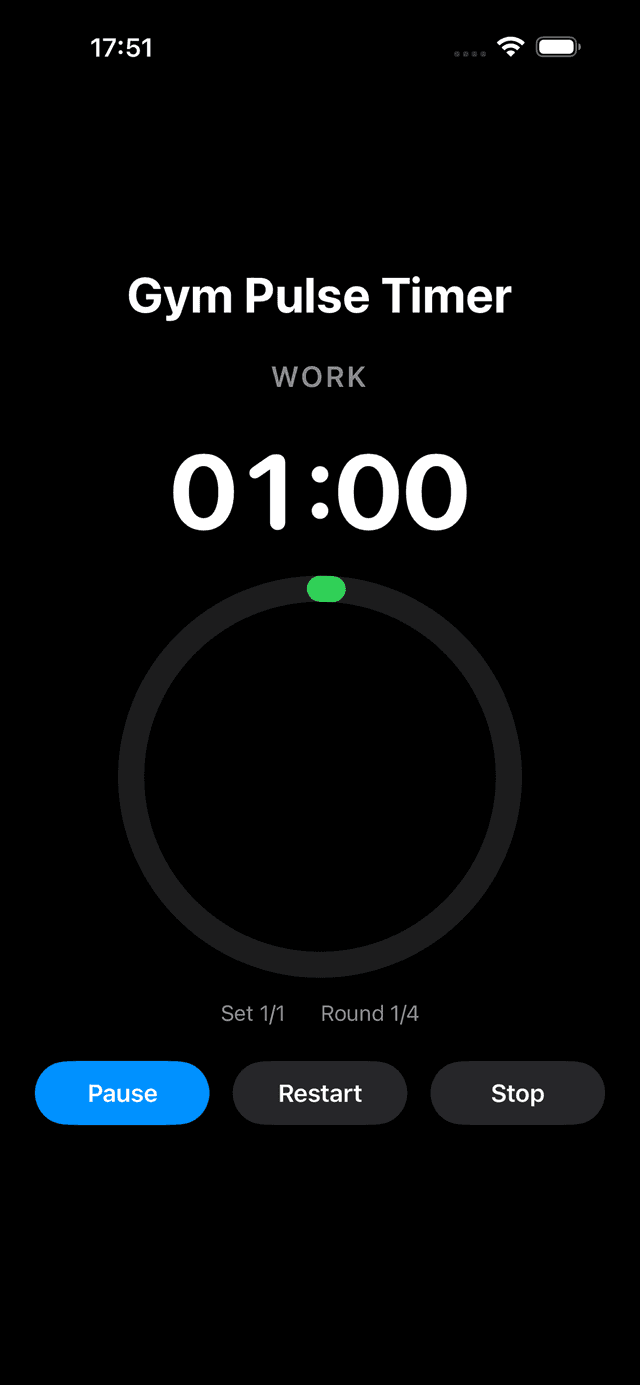
The in-app Work phase in GymPulseTimer — the same phase colour, countdown, and round count drive the Dynamic Island and the Lock Screen Live Activity.
Why a Workout Timer Belongs in the Dynamic Island
An interval timer has one job mid-workout: tell you where you are without asking anything in return. The moment you have to wake the phone, pass Face ID with sweat on your brow, and hunt for the app, the timer has failed at that job. Between sets your hands are chalked, gloved, or wrapped; your phone is in your pocket, propped on a bench, or mounted on a squat rack two metres away. Touching the screen is exactly what you don't want to do.
The Dynamic Island solves this at the operating-system level. Once your timer runs as a Live Activity, it claims the area around the camera cutout and simply stays there — while you queue the next song, answer a message, or film a set. Lock the phone and the same information moves to a full-width Lock Screen card. You never unlock, you never app-switch, and you never lose an interval to a dark screen. That single change is why “dynamic island workout timer” has become its own search category: it is the difference between a timer you babysit and a timer that runs your session.
How Live Activities Drive the Dynamic Island on iOS 26
Under the hood, everything you see in the Dynamic Island is a Live Activity — the API Apple introduced in iOS 16.1 and has expanded every release since. On iOS 26 the system draws that one Live Activity in several places at once, and it helps to know what each surface shows:
- Compact state — the default whenever you are in another app on an iPhone with the pill-shaped cutout (iPhone 14 Pro and, apart from the budget 16e, every iPhone since). GymPulseTimer shows the phase colour on one side of the camera and the live countdown on the other. One glance, zero taps.
- Expanded state — long-press the island and it unfolds into a full card with the current phase spelled out, the time remaining in large digits, and your round count. Tap it to jump straight back into the app.
- Minimal state — when two Live Activities run at once (say, your timer plus a food-delivery order), one shrinks to a small detached circle. Your countdown keeps ticking either way.
- Lock Screen card — on any iPhone running iOS 16.1 or later, cutout or not, the same Live Activity renders as a banner-sized card at the top of the Lock Screen.
- Always-On Display — on iPhones with AOD (14 Pro and later Pro models), the Lock Screen dims but the Live Activity stays rendered, so the countdown remains readable on a bench without a single tap. Live Activities are deliberately power-efficient, so this costs far less battery than any keep-screen-on workaround.
iOS 26 also pushes Live Activities beyond the phone: a timer running on your iPhone can surface in the Smart Stack on a paired Apple Watch and appear in CarPlay. GymPulseTimer goes one step further on the wrist — rather than mirroring the phone, its Apple Watch app runs independently once presets sync, so the workout can live entirely on the watch with the iPhone left in a locker.
For the step-by-step setup — enabling Live Activities, saving a preset, and locking the phone mid-session — see our companion guide to the iPhone Lock Screen workout timer; the permission prompt takes one tap the first time you start a timer.
GymPulseTimer vs Kaizen Timer vs the iOS Clock Timer
Three apps dominate the “timer in the Dynamic Island” conversation in 2026: GymPulseTimer, Kaizen Timer, and the Clock app Apple ships on every iPhone. All three genuinely show a countdown in the island — the differences are in what that countdown knows about your workout and where else it can follow you.
| Dimension | GymPulseTimer | Kaizen Timer | iOS Clock timer |
|---|---|---|---|
| Pricing | Free + one-time $4.99 Pro — no subscription, no ads, no account | One-time purchase | Free (built into iOS) |
| Lock Screen Live Activity | Yes — phase, time remaining, round count | Yes | Yes — a single countdown |
| Dynamic Island states | Compact + expanded | Yes | Yes (system countdown) |
| Work/rest intervals & rounds | Full custom presets — Get Ready, Work, Rest, Sets, Rounds | Yes — interval-focused | No — one countdown at a time |
| Platforms | iPhone, Android, Apple Watch | iPhone (iOS-only) | iPhone (system app) |
| Progress history | Built-in: This Week, consistency heatmap, 7-day journal — on-device, no account | See its App Store listing | None |
| Apple Watch | Watch app runs independently once presets sync | iPhone-first — check its current listing | Separate basic Timer app on watchOS |
| App Store privacy label (iPhone app) | Data Not Collected | See its App Store listing | Apple system app |
Kaizen Timer entries reflect its publicly stated positioning as of July 2026 — an iOS-only interval timer sold as a one-time purchase with Dynamic Island support. Check the current App Store listings for the latest pricing and feature details.
Credit where it is due: Kaizen Timer treated the Dynamic Island as a first-class surface early, and its one-time-purchase pricing honours the same no-subscription principle we argue for. If your training life is entirely on iPhone, it is a genuinely good pick. The gap opens at the edges of the ecosystem: GymPulseTimer also ships an Android app, its Apple Watch app runs independently once presets sync, and the App Store privacy label of its iPhone app reads Data Not Collected. The Clock app, for its part, is unbeatable for boiling pasta; it simply has no concept of work, rest, or rounds. For the wider pricing landscape, our roundup of the best free interval timer app for iPhone compares every no-subscription option side by side.
The Point of a Glanceable Timer: Guarding the Rest
It is worth being clear about why any of this matters. Workouts rarely fail during the sets — they fail during the rest between them, when the phone comes out and ninety seconds quietly becomes five minutes. A timer that lives in the Dynamic Island removes the excuse: the countdown is in your peripheral vision even while you skip a track, and the phase colour flips to work before the drift begins. That idea — structuring the rest itself — is why we built GymPulseTimer in the first place.
In practice the flow looks like this: save a preset once (say 40 seconds work, 20 seconds rest, 8 rounds), start it with one tap, and lock the phone. The Lock Screen card carries the session from there. Switch to your playlist and the compact island keeps the countdown at the top of the screen; long-press it whenever you want the full phase-and-round picture. Audio cues and haptics call every transition, so on most sets you will not look at the phone at all — the island is the backstop, not the attraction.
When the last round ends, the session is not lost. Every phone workout you finish is written to the Progress screen, rebuilt in September 2026 (iOS 1.8.0, Android 1.9.0) as the Discipline Ledger. A This Week card totals your minutes and sessions and, once a few sessions are in, shows how you compare with last week. A plan-honored ring shows how much of what you planned you completed. A consistency heatmap turns every day you trained into a green cell, a weekly chart splits your time by workout with your average drawn across it, and a 7-day journal holds completion rings, effort, and notes. The history stays on the device, with no account and no connection required; Pro adds 26- and 52-week views and a training-load chart. The island guards the rest; the ledger keeps the record honest.
The Bottom Line
The Dynamic Island is the best thing to happen to workout timers since the vibration motor. It gives an interval timer exactly the surface it always needed: persistent, glanceable, and available without a single touch. If you train with an iPhone made in the last few years, the only real question is which timer you put in it — one that shows a bare countdown, or one that knows your phase, your round, and your next transition. GymPulseTimer is free to try, and the full upgrade is a one-time $4.99 — no subscription, no ads, no account.
Put your timer in the Dynamic Island
Free download. No account required. No subscription.
Frequently asked questions
Which interval timer app shows in the Dynamic Island?
Any timer app that implements Apple's Live Activities API with Dynamic Island layouts can appear there. GymPulseTimer renders both the compact state (phase colour plus countdown around the camera cutout) and the expanded state (phase, time remaining, and round count on long-press). Kaizen Timer, an iOS-only one-time-purchase interval timer, also supports the Dynamic Island, and the built-in Clock app shows its single system countdown there as well.
Can I see my workout timer on the iPhone Lock Screen?
Yes. If your timer app supports Live Activities (available on every iPhone running iOS 16.1 or later), the running timer appears as a card on the Lock Screen the moment the phone locks. GymPulseTimer's Lock Screen card shows the current phase in its own colour, the time remaining in large digits, and your round progress — no unlocking required.
Does the timer keep running when the iPhone is locked?
Yes. The countdown, audio cues, and haptics all continue while the iPhone is locked, and the Live Activity keeps the numbers on the Lock Screen current the whole time. Locking the screen is actually the intended way to use an interval timer mid-workout: the phone stays on the bench or the rack, and you only ever glance at it.
What is the best interval timer with Live Activities?
It depends on where you train. If you stay entirely on iPhone, Kaizen Timer is a solid iOS-only one-time-purchase option with Dynamic Island support. If you also train with Android or Apple Watch, GymPulseTimer covers all three — the Watch app runs independently once presets sync — with full compact and expanded Dynamic Island states and a one-time $4.99 Pro upgrade instead of a subscription; the App Store privacy label of its iPhone app reads Data Not Collected. The built-in Clock app is free but only offers a single countdown with no work/rest structure.