Best Free Interval Timer App in 2026 (Tested on iPhone, Android & Apple Watch)
The best free interval timer app in 2026 is GymPulseTimer — a cross-platform HIIT timer with a no-ads free tier on iPhone, Android and Apple Watch, plus an optional $4.99 one-time Pro upgrade instead of a subscription. The rest of this guide explains what “free” actually means in the App Store, and how five other timers stack up.
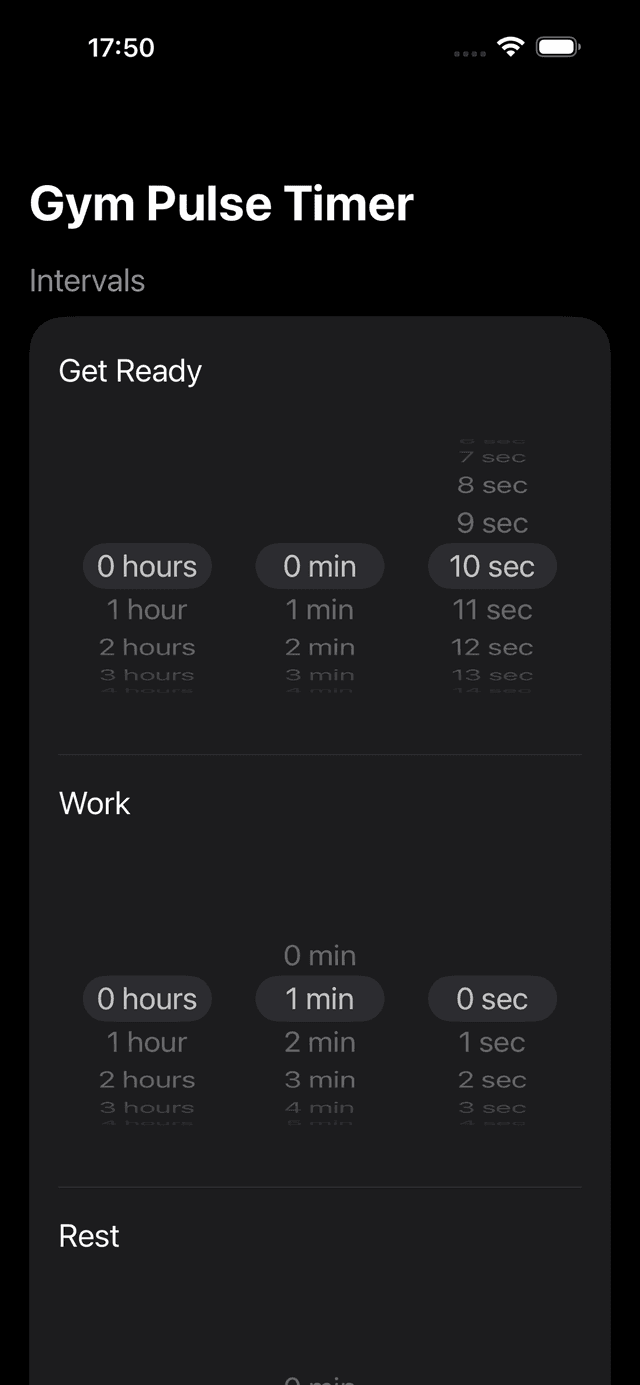
GymPulseTimer interval setup — free tier covers core timing, Pro is a one-time $4.99 upgrade.
What “Free” Actually Means in the App Store
Search the App Store or Google Play for “free interval timer” and you'll get hundreds of results. The problem is that “free” is a marketing label, not a specification. Once you actually install the apps, four very different business models hide behind that single word, and the difference between them is whether the timer is usable mid-set.
Before picking a free interval timer app, it helps to know which of the four tiers it really falls into:
- Truly free — every feature is unlocked, there are no ads, no account, and no upgrade prompts. Almost extinct in dedicated interval timers; the built-in Apple Clock and Google Clock are the surviving examples, but neither does work/rest alternation.
- Generous free tier (honest freemium) — the core timer is free and fully functional, while advanced extras (cloud sync, custom voice packs, music) sit behind a one-time upgrade or subscription. GymPulseTimer belongs here: the $4.99 Pro upgrade is genuinely optional.
- Ad-supported— free to install, but banner or interstitial ads interrupt rest periods or sit between rounds. The worst offenders fire a full-screen video the moment a Tabata cycle ends.
- Free trial / paywalled — the App Store label says “Get Free” but the timer locks core features after a few minutes and demands a subscription. These are the apps that pollute the search results most.
Throughout the reviews below we grade each timer on this scale, so you can decide whether the “free” label is real or marketing.
What Makes a Free Interval Timer Actually Usable
A timer is only as good as how invisible it gets during a workout. If you have to look at the screen, swipe past a paywall, or restart the countdown manually after every round, you've already lost the rhythm. Before choosing a free workout timer app, check that it ticks the following non-negotiable boxes:
- Custom work and rest intervals — configurable in seconds, not locked into a handful of fixed templates. A real interval timer must let you set, for example, a 1 minute interval timer app for EMOM, or 20 seconds on / 10 seconds off for Tabata.
- Audio and voice cues — distinct sounds or spoken cues for each phase, audible above gym music or a treadmill, so you can keep your eyes off the screen.
- Saveable presets— reusable timer configurations so you don't rebuild your Tabata or HIIT routine before every session.
- Live Activities & Wear OS tiles — the timer should appear on your iPhone Lock Screen, Dynamic Island, Apple Watch face, or Wear OS quick-launch tile without unlocking the device.
- No ads, no required account — nothing should sit between the “Start” button and your warm-up. Account walls are a red flag in a timer app.
- Offline operation— the app should run without a network connection, so Wi-Fi blackspots in the gym don't kill your set.
- Dark, high-contrast UI — legible from across the gym, with large phase indicators and time-remaining digits.
Comparison Table — Free Interval Timer Apps Side by Side
The six apps below cover the spectrum from honest freemium to ad-supported to truly free-but-limited built-in clocks. The “Free tier honesty” column maps each app to the four-tier framework above.
| App | Free tier honesty | Platform | Live Activities | Wear OS | Ads | Audio cues |
|---|---|---|---|---|---|---|
| GymPulseTimer | Generous free tier | iOS, Android, Apple Watch | Yes | Planned | None | Voice + tones |
| Seconds Interval Timer | Freemium — subscription for extras | iOS, Android | No | No | None on iOS | Tones, music sync paywalled |
| SmartWOD Timer | Ad-supported free + one-time unlock | iOS, Android | No | No | Banner ads on free tier | Tones |
| Interval Timer (Deltaworks) | Truly free, ad-supported | Android primarily | No | Limited | Yes | Tones, basic voice |
| Tabata Pro | Free trial, paywalled core | iOS | No | No | After paywall | Voice + tones |
| Apple Clock / Google Clock | Truly free, built-in | iOS, Android | Single timer only | Single timer only | None | One alarm sound |
Reviews — 5 Best Free Interval Timer Apps
We installed each app, configured a Tabata (20/10 x 8) preset, and ran it through a full set on iPhone and Android. Here's what each one does well, what falls short, and which tier of “free” it really belongs in.
1. GymPulseTimer — Best Overall (Free + $4.99 Pro)
GymPulseTimer is honest about its model. The free tier is not a stub: you get custom work/rest durations, multiple rounds, voice coaching for phase transitions, and Live Activities on iOS — without a single ad, account prompt, or trial countdown. It runs on iPhone, Android, and ships a standalone Apple Watch companion so the timer continues if the phone is out of range.
The $4.99 one-time Pro upgrade unlocks unlimited presets, extended preset templates, and additional voice packs. There is no subscription, no auto-renewal, and no “premium tier” on top of Pro. If the free tier is enough for your routine, you can use the app indefinitely; if you upgrade, the price is roughly one month of any competing subscription timer.
The reason it tops the list isn't the price — it's that the free tier is genuinely useful for HIIT, Tabata, EMOM, AMRAP, and running intervals out of the box. Combined with native Live Activities, Dynamic Island support on iPhone 14 Pro and later, and the watchOS companion, it's the only entry that covers all three surfaces of the “iPhone, Android and Apple Watch” question.
- Cross-platform: iOS, Android, standalone Apple Watch
- Live Activities on Lock Screen and Dynamic Island
- Voice + tone cues for every phase transition
- No ads, no account, no data collection on free tier
- $4.99 one-time Pro upgrade, no subscription
2. Seconds Interval Timer — Honest Freemium
Seconds is one of the most established interval timers in the App Store and on Google Play. The free version handles template-based Tabata, HIIT, and custom timers competently; advanced features like music integration, cloud sync, and voice pack customisation sit behind a Pro subscription.
On the four-tier scale, Seconds is honest freemium — the free tier is functional, not crippled. The trade-offs are no Live Activities, no Dynamic Island integration, no Apple Watch standalone mode, and frequent in-app prompts to upgrade to Pro. If you don't care about Lock Screen visibility and your routine fits in basic templates, it's a solid free choice.
3. SmartWOD Timer — Best Free CrossFit Timer (Ad-Supported)
SmartWOD is the CrossFit specialist on this list. It ships dedicated modes for AMRAP, EMOM, For Time, and Tabata, and it speaks the language of WOD programming. The free tier is ad-supported, with banner ads on the configuration screen and the occasional interstitial; a one-time in-app purchase removes them.
It's a genuinely useful free workout timer app if your training already follows CrossFit-style WODs. The limitations are that it doesn't integrate with Live Activities, doesn't ship a standalone Apple Watch app, and the CrossFit-specific UI can feel overcomplicated if you only want plain work/rest intervals.
4. Interval Timer by Deltaworks — Best Truly Free on Android
Deltaworks' Interval Timer is the closest thing to a truly free dedicated interval timer on Android. It supports custom work and rest durations, multiple rounds, and voice/tone cues, all without a paywall — revenue comes from banner ads on the configuration screen.
The UI is utilitarian and the design feels older than the competition, but it does the job for everything from Tabata-style 20/10 cycles to longer 1-minute running intervals. There's no Wear OS tile worth using and no Live Activities, so the ads on the free tier are the trade-off you accept in exchange for never paying anything.
5. Tabata Pro — Free Trial, Paywalled Core
Tabata Pro markets itself heavily on free download but funnels users into a subscription after a short trial. Once the trial closes, core features — custom presets, audio packs, and round configurations — lock behind a recurring fee, putting it firmly in the “free trial / paywalled” tier.
The timer engine itself is polished and the voice coaching is good. If you're willing to pay a subscription specifically for a Tabata-flavoured timer, it's a competent product. As a free interval timer app it doesn't belong on the shortlist — the “free” label is the misleading sort.
Best Free Timer for Running Intervals
Running intervals don't need a full HIIT app — they need configurable work/rest durations and voice cues that come through cleanly over headphones at running pace. Common patterns are 1 minute hard / 1 minute easy, 30 seconds on / 90 seconds off, or the classic run/walk method popularised by Jeff Galloway.
Pairing GymPulseTimer with Strava or Apple Fitness
GymPulseTimer's free tier ships a run/walk preset out of the box and announces each phase by voice, so you don't need to glance at your wrist mid-stride. Because it runs in the background and respects audio ducking, you can keep Strava, Apple Fitness, or any GPS run-tracker logging distance and pace at the same time. Tabata-style sprint sessions are easy to encode with a 30 seconds on / 90 seconds off preset, and longer fartlek workouts fit the same configuration screen.
Why the Built-in Clock Isn't Enough
The Apple Clock app on iOS and the Google Clock app on Android are genuinely free with no ads or accounts, which is why they show up in “best free timer app” lists. The problem is that they were never designed for interval training. Both support a single countdown timer at a time, with no concept of alternating work and rest phases, no preset library, no rounds, and no automatic transitions between phases.
In practice this means you would have to restart the timer manually after every interval — tapping a button between every 20-second sprint or 1-minute round — which defeats the entire point of interval training. For a single countdown before a deadlift PR, the built-in Clock is perfect. For a Tabata, EMOM, AMRAP, or anything resembling HIIT, it's not a real fitness timer app.
Free vs. $4.99: Honest Math
A generous free tier covers the day-to-day need: a couple of custom presets, work/rest cycles, voice cues, rounds. A one-time upgrade adds depth without changing the core experience — in GymPulseTimer's case, unlimited presets, additional voice packs, and extended preset templates. There's no recurring charge attached to any of it, and no feature you used yesterday on the free tier disappears tomorrow.
The financial comparison against a subscription timer is brutal. A $6/month subscription adds up to $72 per year; after a single month you've already spent more than the lifetime cost of GymPulseTimer Pro. Over a year, the one-time purchase saves roughly $67 for comparable features — and that's before counting the next year, when the subscription renews and the one-time purchase doesn't. For a tool that ultimately runs a countdown, the math doesn't favour subscriptions.
Our Pick
For the best free interval timer app in 2026, the honest answer is GymPulseTimer. The free tier is usable on iPhone, Android, and Apple Watch without ads or account walls; the optional $4.99 Pro upgrade is a single payment, not a subscription; and the Live Activities and standalone watchOS support fill gaps that the cheaper competitors leave open.
If you specifically want a deeper iPhone-only deep-dive with Live Activities benchmarks, follow the iPhone roundup linked below. Otherwise install GymPulseTimer, build your first preset, and skip the subscription tier entirely.
Ready to try GymPulseTimer?
Free download. No account required. No subscription.
Download on the App Store